
Appearance
Changing things from the dashboard
Two things the dashboard can write on this machine: it can tell dqx about a project or start a new one, and it can change a project's settings.
Both are the commands you could type, behind a form: dqx remember, dqx init --from - and dqx configure --from -.
Adding a project, or starting one
+ add does the two things a dashboard cannot do by looking.
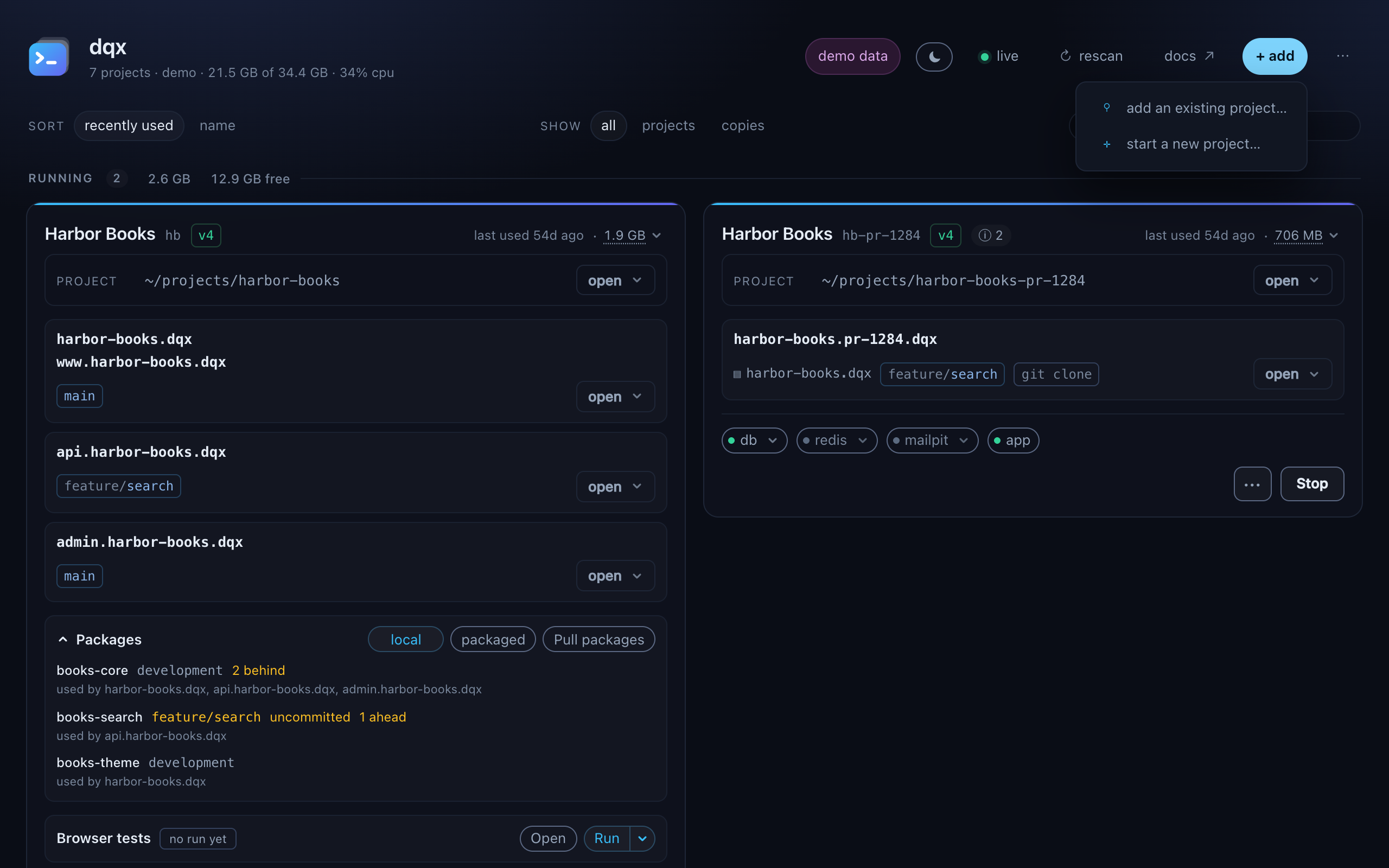
add an existing project… asks for a path. The field arrives holding the tree this machine uses most, so usually only the last segment has to be typed; Choose… opens a real Finder window instead. Nothing is written into the project: it is recorded, the card appears, and it says not adopted until you choose that separately.
bash
dqx remember ~/dockers/northwind-trading    # or: dqx add ~/dockers/…
dqx remember --off ~/dockers/northwind-trading
A directory that is a whole tree of projects rather than a project is refused, with the number of projects in it. Remember one of them and the neighbour scan finds the rest.
start a new project… is a form over dqx init. The name comes first, because the folder, the key and the domain are all proposed from it and each stays editable:
text
Northwind Trading → ~/dockers/northwind-trading · key nt · northwind-trading.dqx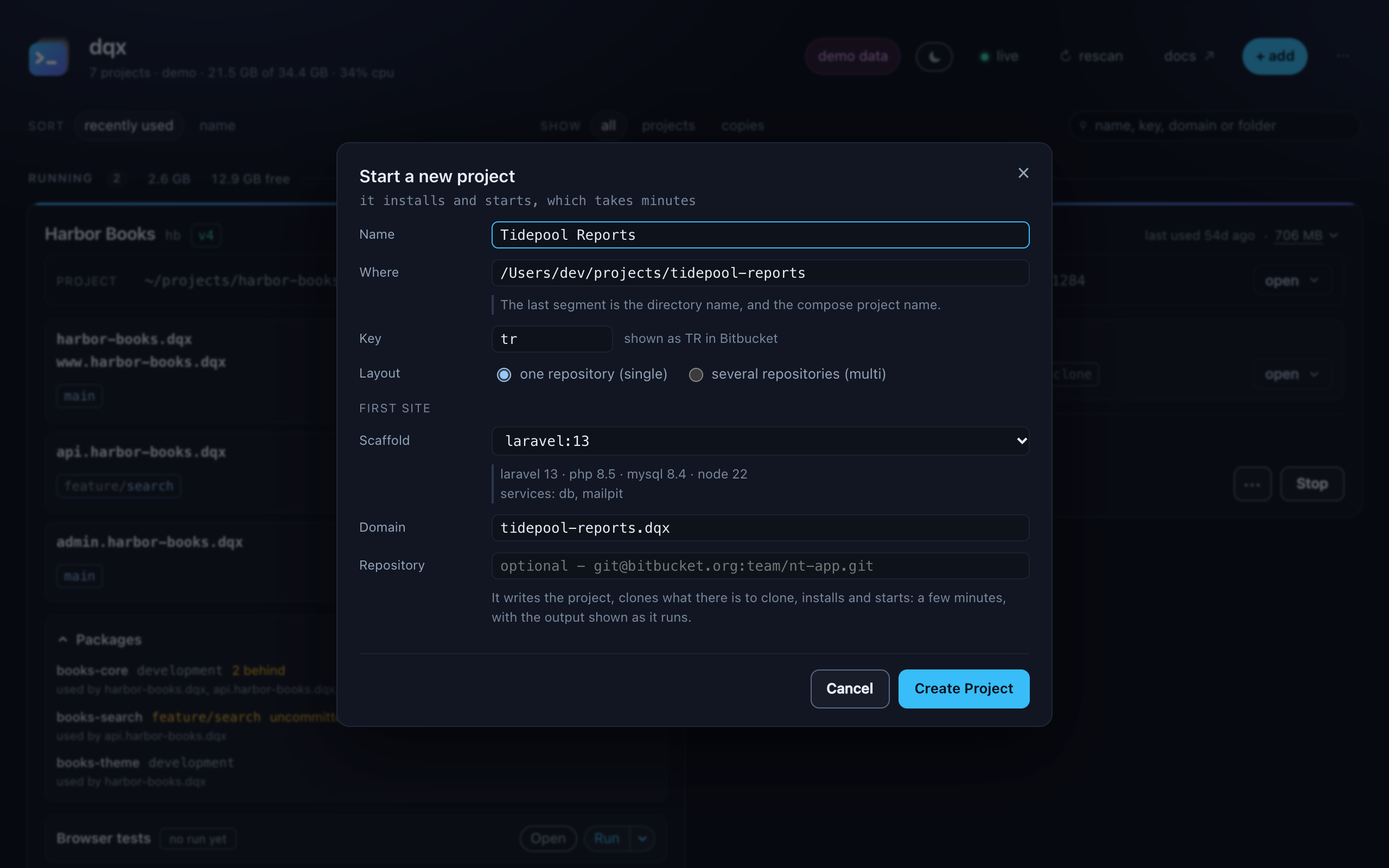
| name, where | the project's name, and its directory; the last segment is also the compose project name |
| key | the client key, with how Bitbucket shows it (shown as NT in Bitbucket). A key another project here already uses is a warning, not a refusal: dqx cannot check Bitbucket from here |
| layout | one repository (single), where the application repository is the project, or several repositories (multi), a wrapper with a checkout per site under www/ |
| first site | the scaffold and the domain of the project's first site. A domain another project already serves is a warning too |
| repository | optional: the git URL of the application, cloned into place |
The scaffold dropdown says what each recipe actually is - its runtime, its services, what it installs
- so the choice is not made on a name alone. New projects are proposed on the machine's default suffix,
.dqxunlessdqx suffix defaultsays otherwise; if no project on this machine uses it yet, the form says so and points atdqx resolver install.
It then installs and starts, which takes minutes, and the output streams into a card of its own. A creation that fails keeps that card and its output: what is left on disk is for a person to read, not for a retry button to run into.
The dashboard will only create beside projects dqx already knows about, or in the tree it proposed. dqx init <path> in a terminal has no such limit.
 1234
1234Changing a project's settings
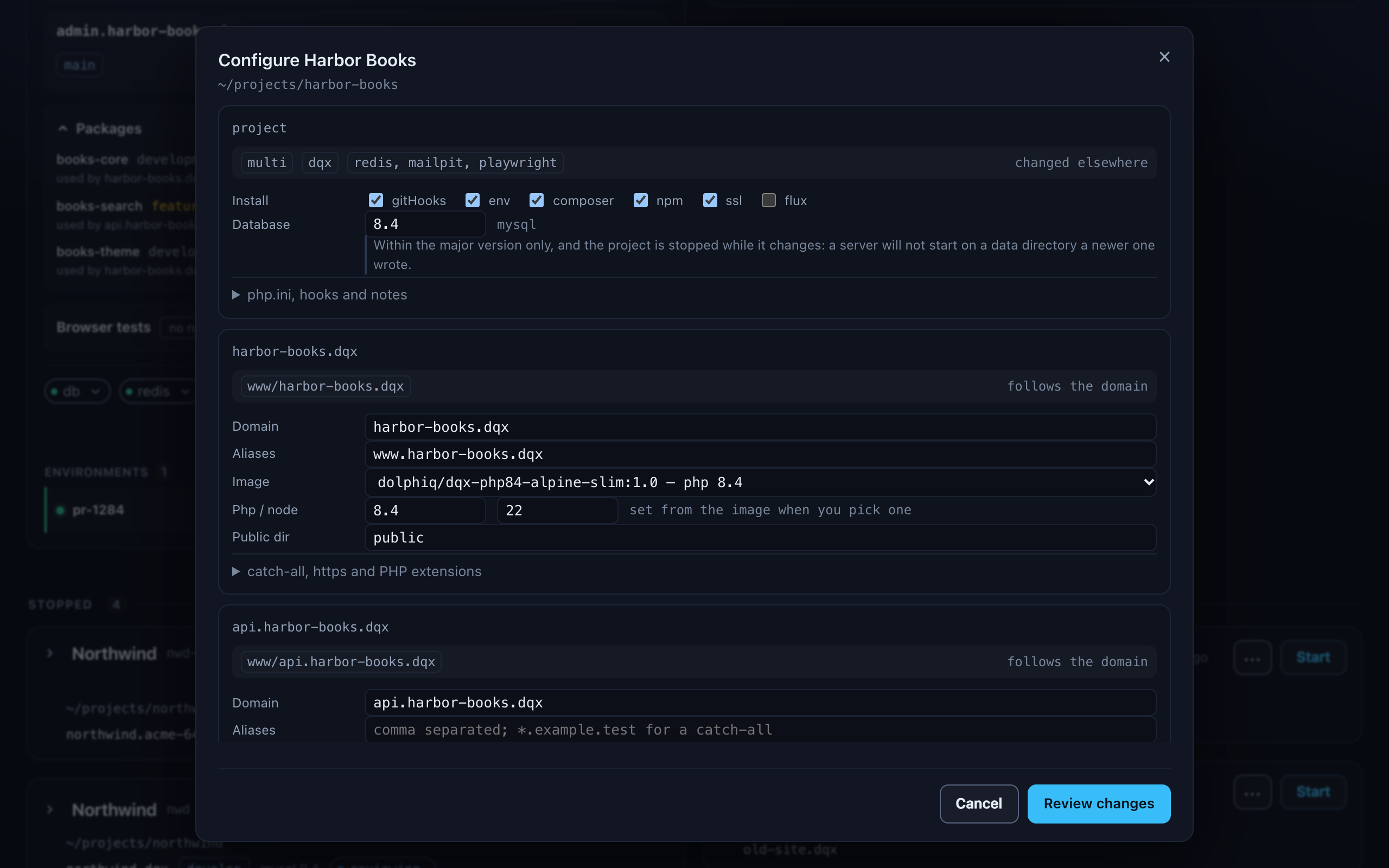
The gear appears on a project dqx manages whose config is the current shape and whose backend is docker - 19 of the 51 cards on this machine - because those are the projects where every file this screen writes applies.
Two steps: the fields, then a review of what will happen. Nothing is written until you have read the second one, because .dq/config.yml is committed and this changes it for the whole team.
What it changes, per project: the install switches, the database version within its major, and under php.ini, hooks and notes the php.ini settings, the pre-commit and post-install hooks and the notes. Per site: its domain with its aliases and, when you want it, its checkout directory; the PHP image with the PHP and node versions that come with it; the public directory; and under catch-all, https and PHP extensions the catch-all subdomains, whether it is secured (served over https) and its PHP extensions. The project's review settings are on its pull requests page: review settings.
What it deliberately does not: the client key (that renames every container, network and generated file), the layout (dqx layout moves the directories and hands back a commit list), and the domain suffix (dqx domains --to <tld> --write moves every domain at once).
The review step shows what changes in .dq/config.yml, and applying keeps the previous file as .dq/config.yml.bak. It takes the cheapest step that makes the change real, and a project that was running is running afterwards:
| notes, hooks, install switches | nothing to restart |
| domain, aliases, catch-all, public directory | the generated files are rewritten and nginx is reloaded; no container is replaced |
| image, PHP, node, services | docker compose up -d replaces what changed and keeps the rest running |
| database version | stopped, changed, started again |
A renamed domain also rewrites every .env value that names the old one, moves the checkout directory when you ask, reissues the certificate, drops the old route and clears the framework caches. Bookmarks, OAuth callbacks and anything a third party registered are yours.
The same thing from a terminal, which is what the dialog posts to:
bash
dqx configure --from patch.yml --dry-run     # the review, changing nothing
dqx configure --from - <<'YAML'
sites:
  - site: harbor-books.dqx
    set:
      php: "8.5"
      image: dolphiq/php85-composer-npm:1
YAML
dqx images --catalogue is the list of house images the picker shows, read from the registry, so a line published this week is there without a dqx release.
Reading the result with something other than a person
bash
dqx configure --from patch.yml --dry-run --json   # {"ok":true,"plan":{…},"steps":[],"log":[]}
dqx images --catalogue --json
configure --json answers with one object and nothing else: plan is what the review printed, steps is what the apply did and in which order, and log holds the progress lines the commands underneath wrote. A refusal comes back the same way, with ok: false, rather than as a line on stderr.
What dqx will not rewrite
A rename ends by naming the project's own files that still hold the old domain:
text
→ still naming harbor-books.dqx in the project's own files - yours to change - www/app/nuxt.config.js:42Reported, never changed: a URL in a nuxt.config.js, a seeder or a test fixture is the project's code. dqx domains --write prints the same list. It looks at the checkouts your config names, skipping dependencies and build output, so it is a scan of what a developer would edit rather than of a gigabyte.
Review settings
The gear does not edit a project's review settings: they live in one place, beside the choices they feed: the ⚙ review settings popup on the project's pull requests page, with a tab for the project's review: block and one for this machine's defaults. The gear's screen keeps one line that opens it:

Open review settings ↗ opens the project's pull requests page in a new tab with the popup open on This project. What each field does, and how a project without a dqx config is handled: review settings.